



Customers often see the CNC machine cutting. The spindle is running, chips are coming off the material, coolant is flowing, and the part is slowly taking shape. This is the most visible part of CNC machining, but it is not where most process decisions begin.
Many of the key factors behind quality, cost, lead time, and machining risk are already shaped before the first chip is cut. The machine follows a process. The quality of that process depends on how the drawing is reviewed, how the toolpath is planned, how the program is prepared, and how machining risks are checked before production starts. This is why a reliable CNC machining service should look beyond the model geometry and evaluate the real manufacturing route.
At JADE-CNC, pre-machining review focuses on practical questions: Can the part be held securely? Can the tool reach all critical features? Will a thin wall deform? Will a deep cavity cause chatter? Does the surface finish match the machining route? Should a precision hole be roughed first and finished later?
This article explains the role of CAD, CAM, G-code, and M-code in CNC machining, and why good CNC work is not just pressing the start button.
1. Why CNC Quality Starts Before Machining
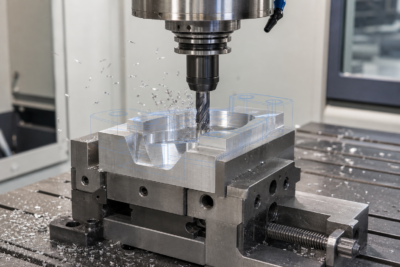
A CNC machine does not decide the best manufacturing strategy by itself. It executes the instructions prepared by engineers and operators. If the drawing is misunderstood, the fixture is weak, the toolpath is risky, or the program is not checked, the final part may show dimensional errors, poor surface finish, tool marks, deformation, or assembly problems.
Before machining starts, process planning connects the design intent with the real behavior of material, tools, fixtures, and machines. This is especially important for deep cavity parts, thin-walled housings, precision holes, threaded features, cosmetic surfaces, and components that require stable assembly.
The same 3D model can be machined in several different ways. The difference between a stable process and a risky process often appears in cycle time, surface finish, tool life, scrap rate, and delivery reliability.
A simple bracket, for example, may only need standard milling and drilling. A robot joint housing may require strict datum control, bearing seat boring, multi-side machining, and inspection of coaxiality or perpendicularity. An RF cavity may require careful wall finish, clean internal corners, and controlled coating or masking after machining. These decisions are not made by the machine automatically. They are made during review and programming.
2. CAD: Understanding the Drawing and Critical Requirements
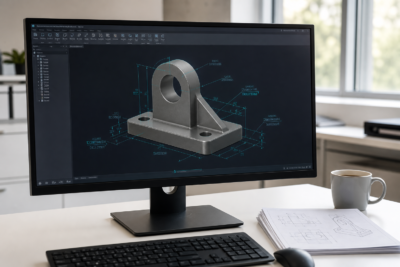
CAD is the design stage. It defines the part model and drawing information, including material, tolerance, holes, threads, surface finish, datum references, and critical dimensions.
A CAD file is more than a shape. It tells the machining team what must be controlled. A mounting surface may need flatness control. A hole pattern may need positional accuracy. A visible surface may need a cleaner machining or finishing route. A threaded hole may need enough usable thread depth for assembly. Each requirement affects the process plan.
When a drawing arrives, the first engineering task is to identify which features affect function. These may include bearing seats, sealing faces, threaded holes, mating surfaces, thin walls, deep pockets, or cosmetic areas. These features influence fixture design, machining sequence, tool selection, and inspection planning.
Material also matters at the CAD review stage. Aluminum 6061-T6, 7075-T6, stainless steel, copper, titanium, POM, ABS, and PC all behave differently during machining. Material choice affects cutting parameters, tool wear, burr risk, deformation control, and surface finish.
For aluminum parts, high-speed cutting can often achieve efficient material removal, but burr control and surface consistency still matter. For stainless steel, heat, work hardening, and tool wear need more attention. For engineering plastics, clamping pressure and cutting heat may affect final dimensions. This is why material review should happen before programming, not after machining starts.
3. CAM: Turning the Design Into a Machining Strategy
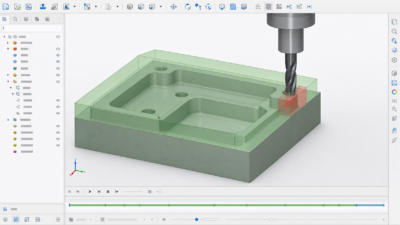
CAM is the manufacturing preparation stage. If CAD answers what to make, CAM answers how to make it.
During CAM programming, the engineer selects cutting tools, machining sequence, roughing strategy, finishing paths, feeds, speeds, step-over, depth of cut, and safe tool movement. The output is a CNC program that the machine can run.
A good CAM plan considers both geometry and risk. Deep cavities may require longer tools, but long tool extension reduces rigidity and increases chatter risk. Thin-walled parts may need lighter finishing cuts and balanced material removal. Precision holes may need drilling, rough boring, and finish boring instead of one simple operation.
For standard prismatic components, a stable CNC milling service route may be enough. For parts with multiple angled faces, undercuts, or complex access requirements, 5-axis CNC machining may reduce setup changes and improve feature alignment. For round shafts, pins, sleeves, or turned features, CNC turning service may be part of the total process route.
This is where CNC machining becomes engineering work. The goal is not only to cut the shape, but to cut qualified parts repeatedly and safely.
4. Why the Same Model Can Produce Different Results
The same 3D model can produce different results depending on the machining strategy. One process may be fast but leave obvious tool marks. Another may create a smoother surface but require more cycle time. A third may look acceptable in simulation but become unstable during real cutting because of tool overhang, poor chip evacuation, or weak fixturing.
Toolpath decisions can affect cycle time, surface finish, tool marks, dimensional stability, and machining safety. For cosmetic surfaces, the direction and spacing of finishing passes may change the visible texture. For thin walls, aggressive cutting may cause deflection. For deep pockets, poor tool access may create chatter or collision risk.
Surface treatment also depends on earlier machining choices. A part that will be anodized, painted, brushed, or polished needs suitable edge condition and surface preparation before finishing. If burrs, deep tool marks, or inconsistent textures remain, the later CNC surface finishing process may make these issues more visible rather than hide them.
This is why programming before machining matters. A good process reduces the chance of discovering problems only after the finished part is already made.
5. Common Machining Risks Found Before Production
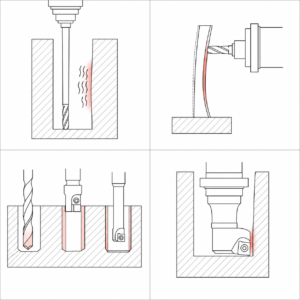
Experienced machining teams look for risk before machining begins. This review helps reduce rework, scrap, tool breakage, and delivery delays. The specific risk depends on part geometry, material, tolerance, quantity, and surface finish requirements.
- Deep cavities: Tool extension length must be evaluated early. A long tool may reach the cavity, but it may not cut stably. Chatter, poor surface finish, and dimensional deviation can appear if rigidity is not enough. The process may need shorter step-downs, a different holder, rest machining, or adjusted roughing allowance.
- Thin-walled parts: Thin walls can deform due to cutting force, clamping pressure, or residual material stress. Balanced roughing, proper allowance, stress release time, and controlled finishing passes should be considered. A thin aluminum housing may look correct while clamped, then spring back after release.
- Precision holes: Precision holes often need a staged process such as drilling, rough boring, semi-finishing, and final boring or reaming. A single drilling operation may not be enough for tight fit, roundness, or surface finish requirements. Bearing seats and locating holes should be reviewed carefully.
- Tool interference: The cutting tool may reach the surface, but the holder or nut may collide with the sidewall in deep or narrow areas. Toolholder geometry should be included in simulation when required, especially for cavities, molds, housings, and multi-axis features.
- Thread machining: Tapping may be efficient for small threads and suitable materials. Thread milling can be safer for larger threads, harder materials, or cases where thread size adjustment is useful. The choice affects tool list, cycle time, and assembly reliability.
- Inspection planning: Critical dimensions should be identified before production so the inspection method is ready. A part that needs tight hole position, flatness, or parallelism may require more than a quick visual check. The right CNC quality inspectionplan helps confirm the part before shipment.
6. G-Code: Controlling Tool Movement
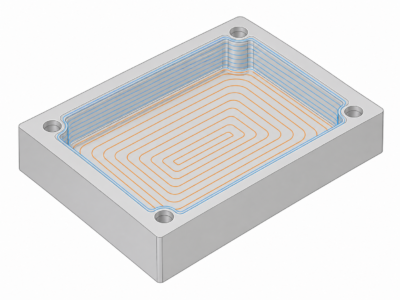
G-code mainly controls machine movement. It tells the CNC machine where the tool goes, how fast it moves, what path it follows, and which coordinate system or compensation mode is active.
For customers, the key point is not to memorize code numbers. The important point is that G-code translates the CAM toolpath into machine movement. If the toolpath, coordinate setup, or compensation is wrong, the part may not match the drawing.
G-code also affects how smoothly the machine moves through curves, how holes are processed, and how tool compensation is applied. A contour with many short line segments may not behave the same as a clean arc interpolation. A drilling cycle may be efficient, but it still needs the correct depth, retract plane, coolant, and chip evacuation plan.
| Category | Typical Codes | Function |
| Motion control | G00 / G01 / G02 / G03 | Rapid movement, linear cutting, and arc movement |
| Plane selection | G17 / G18 / G19 | Selects XY, XZ, or YZ machining plane |
| Tool compensation | G41 / G42 / G43 | Controls radius and length compensation |
| Canned cycles | G81-G89 | Supports drilling, boring, tapping, and related cycles |
| Coordinate systems | G54-G59 | Selects work coordinate systems |
A simplified example may include G54 for work coordinate selection, M06 for tool change, M03 for spindle start, M08 for coolant on, and G81 for a drilling cycle. In real production, the program must match the machine control system and the actual setup.
7. M-Code: Controlling Machine Support Actions
If G-code tells the machine how to move, M-code tells it what supporting actions to perform. These actions may include spindle start, spindle stop, coolant on, coolant off, tool change, optional stop, and other machine functions.
M-code can vary by machine builder and controller. This is why CNC programs should be prepared and checked according to the actual machine, not only the CAM software output.
In daily production, G-code and M-code work together. Before a tool cuts, the machine may need to move to a safe position, change tools, load tool length compensation, start the spindle, and turn on coolant. If any supporting action is missing or incorrectly sequenced, the toolpath may be correct on screen but unsafe on the machine.
| Code | Function |
| M03 / M04 / M05 | Spindle clockwise, counterclockwise, or stop |
| M06 | Tool change |
| M08 / M09 | Coolant on or off |
| M00 / M01 | Program stop or optional stop |
| M30 | Program end and reset |
8. DFM Review and Simulation Before the 1st Step
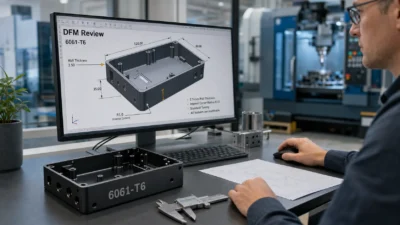
Good CNC machining is not just pressing the start button. Before production, DFM review and simulation help identify problems while they are still cheaper and easier to solve.
A DFM review checks whether the design can be machined reliably. It may review minimum corner radius, depth-to-diameter ratio, wall thickness, tolerance reasonableness, material-process fit, thread depth, surface finish requirements, and cost drivers.
Machining simulation can help catch many basic programming risks, including tool collision, holder interference, gouging, unmachined areas, and unsafe rapid moves. Simulation does not replace real machining experience, but it helps reduce avoidable programming mistakes before trial cutting.
A complete process plan may include an operation route, tool list, setup plan, machining notes, and inspection plan. These documents support repeatable machining quality, especially when parts move from prototype to small-batch production.
For application-specific parts, DFM review should also consider the final use case. A component for robotics CNC machining may need stable bearing seats, lightweight pockets, and accurate mounting faces. A component for communication equipment CNC machining may need cavity accuracy, RF-related surfaces, coating control, or environmental durability. These requirements should be understood before programming.
9. How JADE-CNC Helps Reduce Machining Risk
JADE-CNC does not treat CNC machining as a simple file-to-machine operation. When a customer sends CAD files and drawings, our team can review the part from material, tolerance, tool access, fixturing, surface finish, and inspection perspectives before production starts.
For deep cavity parts, we may review tool extension, holder clearance, roughing allowance, and chatter risk. For thin-walled parts, we may review clamping strategy, cutting sequence, and deformation control. For precision holes, we may review the roughing and finishing route before confirming the machining plan.
Depending on the project requirement, JADE-CNC can support DFM feedback, process planning notes, machining risk review, and first article inspection for critical dimensions. The goal is to find potential problems before machining, not after the finished part is already made.
When material selection is still open, our team can also discuss practical routes for aluminum CNC machining, stainless steel CNC machining, copper, titanium, and engineering plastic parts. The final recommendation depends on drawing requirements, quantity, surface finish, cost target, and application conditions.
10. Conclusion
CNC machining quality is planned before it is cut. CAD defines the design requirements. CAM turns the design into a machining strategy. G-code controls tool movement. M-code coordinates supporting machine actions. These stages work together to turn a drawing or 3D model into a reliable physical part.
When a CNC part has tight tolerances, deep cavities, thin walls, precision holes, threaded features, or surface finish requirements, supplier selection should not rely only on machine models and quotations. The invisible work before machining often determines whether the final part can be produced accurately, efficiently, and reliably.
JADE-CNC helps customers review machining risks before production starts, so problems can be found earlier and controlled with a practical process plan. This is the difference between simply running a program and building a reliable CNC machining process.
CTA
Send JADE-CNC your drawings, CAD files, material requirements, quantity, tolerance needs, surface finish requirements, and application details. Our team can review the most practical CNC machining and finishing route for your project.
FAQ
What is the difference between CAD and CAM in CNC machining?
CAD defines the part design and drawing requirements. CAM prepares the machining strategy and toolpaths used to manufacture the part.
What is the difference between G-code and M-code?
G-code controls tool movement, while M-code controls supporting machine actions such as spindle start, coolant, tool change, and program stop.
Why does CNC programming affect part quality?
Programming decisions affect toolpath strategy, cycle time, surface finish, tool marks, deformation risk, machining stability, and dimensional accuracy.
Why is DFM review important before CNC machining?
DFM review helps identify tool access issues, tolerance risks, thin-wall deformation, deep-cavity challenges, fixture problems, and surface finish concerns before production.
What files should be sent before CNC machining?
A complete RFQ should include 2D drawings, 3D CAD files, material requirements, tolerances, quantity, surface finish requirements, and application notes when available.
Can the same CAD model be machined in different ways?
Yes. Different toolpaths, fixtures, tools, machines, and inspection plans can lead to different cycle times, surface finishes, dimensional stability, and cost.